Elasticsearch概括

ELK简介

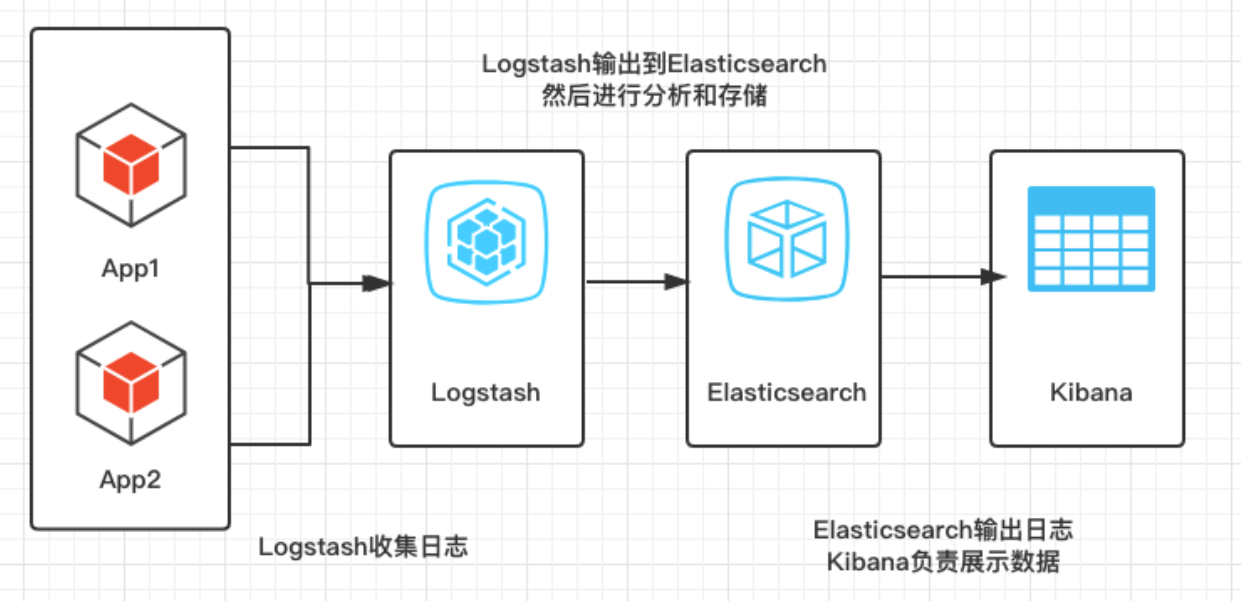
ELK是以Elasticsearch为核心的技术栈,包括Elasticsearch、Logstash、Kibana、Beats

ELK简介
Elasticsearch存储,计算,搜索,实时的分布式搜索和分析引擎,可以用于全文搜索,结构化搜索以及分析
Logstash+Beats数据抓取,具有实时渠道能力的数据收集引擎
Kibana数据可视化,分析和可视化的 Web 平台

Elasticsearch简介

(1)Elasticsearch是一个开源的分布式的RESTful 风格的搜索和数据分析引擎

(2)Elasticsearch可以用来实现搜索、日志统计、分析、系统监控等功能

(3)Elasticsearch底层是基于Lucene搜索引擎构建的,利用了Lucene的核心代码来实现全文搜索和分析,对Lucene进行了进一步的封装和优化,提供了更加简单和易用的RESTful API,从而能够更方便地进行搜索和分析操作(Lucene是一款使用Java语言编写的功能强大的全文索引和搜索引擎,是Apache公司的顶级项目)

MySQL与Elasticsearch的关系

区别简介
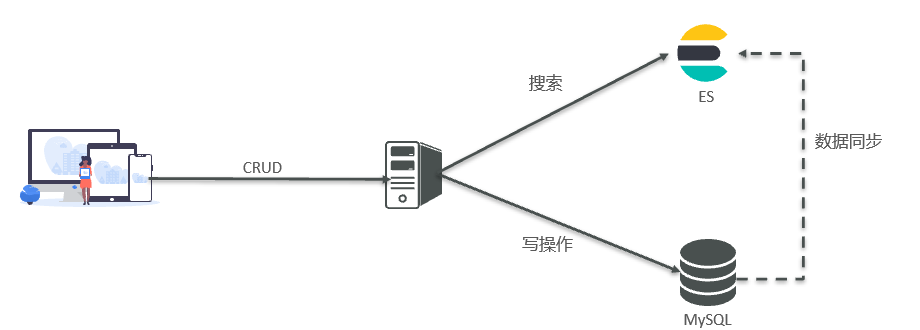
Mysql擅长事务类型操作,可以确保数据的安全和一致性
Elasticsearch擅长海量数据的搜索、分析、计算

MySQL与Elasticsearch概念差异

MySQLElasticsearch说明
表(Table)索引(Index)文档的集合,类似数据库的表(table)
行(Row)文档(Document)一条条的数据,类似数据库中的行(Row),文档都是JSON格式
列(Column)字段(Field)JSON文档中的字段,类似数据库中的列(Column)
约束(Schema)映射(Mapping)索引中文档的约束,例如字段类型约束。类似数据库的表结构(Schema)
SQLDSLElasticsearch提供的JSON风格的请求语句,用来操作elasticsearch,实现CRUD

倒排索引

倒排索引是什么

倒排索引(Inverted Index)是一种常见的文本索引结构,用于提高搜索引擎和数据库系统的检索效率。

它通过将文档中的关键词作为索引项,在索引中记录关键词出现的位置信息,从而实现快速的关键词搜索。

倒排索引两个主要部分

词典(Dictionary):保存了所有出现过的关键词,在搜索时可以根据关键词快速定位到对应的倒排列表。

倒排列表(Inverted List):记录了每个关键词在哪些文档中出现以及出现的位置信息。

正向索引和倒排索引的举例

(1)假设我们有三篇文章

1
2
3
文档1:我喜欢踢足球
文档2:我喜欢看电影
文档3:我喜欢玩游戏

(2)对于这些文章,它们的正向索引可以表示为

1
2
3
文档1:我、喜欢、踢、足球
文档2:我、喜欢、看、电影
文档3:我、喜欢、玩、游戏

(3)倒排索引可以表示为

1
2
3
4
5
6
7
8
我:文档1、文档2、文档3
喜欢:文档1、文档2、文档3
踢:文档1
足球:文档1
看:文档2
电影:文档2
玩:文档3
游戏:文档3

(4)正向索引:如果用户搜索 “文档3”,那么根据正向索引,我们可以很快地找到文档3的内容:”我喜欢玩游戏”。

(5)倒排索引:如果用户没有直接输入文档编号,而是输入了一些关键词,则可以使用倒排索引来查找相关的文档

(6)对于搜索而言,使用正排索引进行搜索是一个较慢的过程,通过倒排索引搜索就非常快

  • 正向索引在搜索时需要遍历整个索引,查找包含指定关键词的所有文档,因此相对比较慢。
  • 倒排索引通过将关键词与对应的文档列表关联起来,使得搜索时可以直接通过关键词快速定位到相关的文档

Elasticsearch和Kibana安装

准备阶段

(1)准备一台可以使用的虚拟机,已经安装了docker环境

(2)使用docker创建一个网络

1
docker network create es-net

(3)Elasticsearch和kibana镜像体积接近1G,不建议pull拉取,将镜像的tar包上传到虚拟机中,然后运行命令加载

1
2
docker load -i es.tar
docker load -i kibana.tar

部署单点ES

(1)运行docker命令,部署单点ES

1
2
3
4
5
6
7
8
9
10
11
docker run -d \
--name es \
-e "ES_JAVA_OPTS=-Xms256m -Xmx256m" \
-e "discovery.type=single-node" \
-v es-data:/usr/share/elasticsearch/data \
-v es-plugins:/usr/share/elasticsearch/plugins \
--privileged \
--network es-net \
-p 9200:9200 \
-p 9300:9300 \
elasticsearch:7.12.1
参数简介
-e “cluster.name=es-docker-cluster”设置集群名称
-e “http.host=0.0.0.0”监听的地址,可以外网访问
-e “ES_JAVA_OPTS=-Xms512m -Xmx512m”内存大小
-e “discovery.type=single-node”非集群模式
-v es-data:/usr/share/elasticsearch/data挂载逻辑卷,绑定es的数据目录
-v es-logs:/usr/share/elasticsearch/logs挂载逻辑卷,绑定es的日志目录
-v es-plugins:/usr/share/elasticsearch/plugins挂载逻辑卷,绑定es的插件目录
–privileged授予逻辑卷访问权
–network es-net加入一个名为es-net的网络中
-p 9200:9200端口映射配置

(2)在浏览器中查看elasticsearch的响应结果:http://主机地址:9200/

Kibana安装

(1)运行docker命令,部署kibana

1
2
3
4
5
6
7
docker run -d \
--name kibana \
-e ELASTICSEARCH_HOSTS=http://es:9200 \
-e "I18N_LOCALE=zh-CN" \
--network=es-net \
-p 5601:5601 \
kibana:7.12.1
参数简介
–name kibana指定docker镜像运行时的name
–network es-net加入一个名为es-net的网络中,与elasticsearch在同一个网络中
-e ELASTICSEARCH_HOSTS=http://es:9200设置elasticsearch的地址,连接elasticsearch 因为kibana已经与elasticsearch在一个网络,因此可以用容器名直接访问elasticsearch
-e “I18N_LOCALE=zh-CN”kibana 汉化,将语言指定为汉语
-p 5601:5601端口映射配置

(2)启动kibana,一般启动比较慢,需要多等待一会

1
docker logs -f kibana

(3)在浏览器输入地址查看结果:http://主机地址:5601/

操作ES的RESTful语法

语法简介
GET请求查询
POST请求新增数据
PUT请求一般用于修改
DELETE请求删除

入门使用(_cat)

Elasticsearch 都是通过 REST API 接口来操作数据的,所以可以利用接口测试工具简单使用Elasticsearch

接口简介
GET http://主机地址:9200/_cat/nodes查看所有节点(/_cat/nodes)
GET http://主机地址:9200/_cat/health查看ES健康状况(/_cat/health)
GET http://主机地址:9200/_cat/master查看主节点信息(/_cat/master)
GET http://主机地址:9200/_cat/indices查看所有索引(/_cat/indicies)

Index索引

创建

语法作用
PUT /index_name创建一个新的索引
PUT /index_name_alias创建新的索引别名
PUT /_template/template_name创建新的模板

查询

语法作用
GET /_cat/indices?v获取所有索引信息
GET /_cat/indices/index_name?v获取特定索引的信息
GET /_cat/templates?v获取所有模板信息
GET /_cat/templates/template_name?v获取特定模板的信息

删除

语法作用
DELETE /index_name删除整个索引
DELETE /index_name_alias删除索引别名
DELETE /_template/template_name删除模板

修改

语法作用
PUT /index_name/_settings更改分片相关配置
PUT /index_name/_alias/alias_name添加新的索引别名
POST /index_name/_close, POST /index_name/_open关闭、打开索引
POST /_aliases批量更新索引别名

Mapping映射

创建

语法作用
PUT /index_name创建一个新的索引
PUT /index_name/_mapping创建新的映射

查询

语法作用
GET /index_name获取索引信息
GET /index_name/_mapping获取特定索引的映射
GET /index_name/_mapping/field_name获取特定字段的映射

删除

语法作用
DELETE /index_name删除整个索引
DELETE /index_name/_mapping删除整个映射
DELETE /index_name/_mapping/field_name删除特定字段的映射

修改

语法作用
PUT /index_name/_mapping/field_type添加新字段
PUT /index_name/_mapping更新整个映射
POST /index_name/_update_by_query执行查询并进行更新
PUT /index_name/_settings更改分片相关配置

Document文档

创建

语法作用
PUT /index_name/_doc/document_id创建新文档
POST /index_name/_doc自动生成文档 ID 并创建新文档

查询

语法作用
GET /index_name/_doc/document_id获取特定的文档
GET /index_name/_search搜索整个索引中文档
GET /index_name/_mget获取多个文档
GET /index_name/_count获取匹配查询条件的文档数量

删除

语法作用
DELETE /index_name/_doc/document_id删除单个文档
DELETE /index_name删除整个索引
DELETE /index_name/_query删除匹配查询条件的所有文档

修改

语法作用
POST /index_name/_update/document_id更新现有文档
PUT /index_name/_mapping更新整个映射
POST /index_name/_reindex在不同索引之间重新索引文档

分词器

将一段文本,按照一定的逻辑,分析成多个词语的一种工具

Elasticsearch内置的分词器

分词器简介
Standard tokenizer标准分词器,按照非字母字符进行切分
Letter tokenizer字母分词器,将非字母字符作为分隔符,只保留字母
Lowercase tokenizer小写分词器,将所有文本转为小写
Whitespace tokenizer空格分词器,以空格作为分隔符
Keyword tokenizer关键字分词器,将整个文本作为一个单独的关键字
Path hierarchy tokenizer路径分层分词器,根据路径中的斜杠(/)进行分词,并生成层级结构
Edge NGram tokenizer边缘NGram分词器,按照指定长度从文本的开头开始生成N-Gram序列
N-Gram tokenizerNGram分词器,将文本按照指定长度生成N-Gram序列
Pattern tokenizer模式分词器,使用正则表达式进行文本切分
Uax URL email tokenizerURL和电子邮件地址分词器,能够识别URL和电子邮件地址,并将它们视为单独的词语。

IK分词器安装

Elasticsearch内置的分词器一般都是针对于英文,对于中文的处理方式为一个字一个词,而我们在搜索时,需要对用户输入内容分词,处理中文分词,一般会使用IK分词器

(1)安装插件需要知道elasticsearch的plugins目录位置,而我们用了数据卷挂载,因此需要查看elasticsearch的数据卷目录

1
docker volume inspect es-plugins

运行结果如下,说明plugins目录被挂载到了/var/lib/docker/volumes/es-plugins/_data 这个目录中

1
2
3
4
5
6
7
8
9
10
11
[
{
"CreatedAt": "2022-05-06T10:06:34+08:00",
"Driver": "local",
"Labels": null,
"Mountpoint": "/var/lib/docker/volumes/es-plugins/_data",
"Name": "es-plugins",
"Options": null,
"Scope": "local"
}
]

(2)进入挂载目录,上传到es容器的插件数据卷中

1
cd /var/lib/docker/volumes/es-plugins/_data

(3)重启容器

1
docker restart es

Ik分词器拓展词库与停用词库

(1)进入ik分词器目录中的config目录

1
cd /var/lib/docker/volumes/es-plugins/_data/ik/config

(2)修改IkAnalyzer.cfg.xml文件

1
vim IKAnalyzer.cfg.xml 
1
2
3
4
5
6
7
8
9
10
11
12
13
<?xml version="1.0" encoding="UTF-8"?>
<!DOCTYPE properties SYSTEM " http://java.sun.com/dtd/properties.dtd">
<properties>
<comment>IK Analyzer 扩展配置</comment>
<!-- 用户可以在这里配置自己的扩展字典 — 添加扩展词典-->
<entry key="ext_dict">ext.dic</entry>
<!-- 用户可以在这里配置自己的扩展停止词字典 — 添加停用词词典-->
<entry key="ext_stopwords">stopword.dic</entry>
<!-- 用户可以在这里配置远程扩展字典 — 添加扩展词典 -->
<entry key="remote_ext_dict">https://xxx.com/xxx.txt</entry>
<!-- 用户可以在这里配置远程扩展停止词字典 — 添加停用词词典 -->
<entry key="remote_ext_stopwords">words_location</entry>
</properties>

(3)创建名为ext.dic的文件,添加拓展词语

1
vim ext.dic

(4)创建名为stopword.dic的文件,添加停用词语

1
vim stopword.dic

(5)重启容器

1
docker restart es

Query DSL

完整Query DSL语法

1
2
3
4
5
6
7
8
9
10
11
12
13
14
15
16
17
18
19
20
21
22
23
24
25
26
27
28
29
30
31
32
33
34
35
36
37
38
39
40
41
42
43
44
45
46
47
48
49
50
51
52
53
54
55
56
57
58
59
60
{
"query": { // 查询语句
"bool": { // bool查询,可以包含多个子句
"must": [
{ // 必须满足的子句,相当于SQL的AND
// 某些查询语句,例如match、term等,放置于此处
},
{
// 另外一个必须满足的子句
}
],
"should": [
{ // 应该满足的子句,相当于SQL的OR
// 某些查询语句,例如match、term等,放置于此处
},
{
// 另外一个应该满足的子句
}
],
"must_not": [
{ // 不应该满足的子句,相当于SQL的NOT
// 某些查询语句,例如match、term等,放置于此处
},
{
// 另外一个不应该满足的子句
}
]
}
},
"sort": [
{ // 排序规则
"field1": { // 要排序的字段名称
"order": "asc" // 排序方向:升序(asc)或降序(desc)
},
"field2": { // 另外一个要排序的字段
"order": "desc"
}
}
],
"from": 0, // 要跳过的结果数,0表示从第一个结果开始
"size": 10, // 要返回的结果数
"_source": [
"field1",
"field2"
], // 要返回的字段列表,默认返回所有字段
"aggs": { // 聚合查询
"agg1": { // 聚合名称
"terms": { // 使用terms聚合函数
"field": "category" // 要聚合的字段
},
"aggs": { // 嵌套聚合查询
"agg2": { // 聚合名称
"avg": { // 使用avg聚合函数
"field": "price" // 要聚合的字段
}
}
}
}
}
}

Java操作ES

Java操作Elasticsearch方案

方案简介
直接使用 HTTP 请求直接使用 HTTP 请求去操作 Es,可以使用 Java 自带的 HttpUrlConnection, 也可以使用一些 HTTP 请求库:HttpClient、OKHttp、Spring 中的 RestTemplate等 弊端:自己组装请求参数,自己去解析响应的 JSON
TransportClient客户端传统客户端,使用Transport 接口进行通信,能够使用ES集群中的一些特性 TransportClient 在 Es7 中已经被弃用,在 Es8 中将被完全删除
Low Level REST Client用于 Es 的官方的低级客户端,这种方式允许通过 HTTP 与 Es 集群进行通信, 优势:兼容所有的 Es 版本。弊端:求 JSON 参数和响应 JSON 参数交给用户去处理
High Level REST Client用户 Es 的官方的高级客户端,基于 Low LevelREST Client 提供了很多 API,这种方式允许通过 HTTP 与 Es 集群进行通信 开发者不需要自己去组装参数,也不需要自己去解析响应 JSON 但要求对ES的DSL语句熟悉,方便自己做复杂的增删改查,并且使用的依赖库的版本要和 Es 对应
Spring Data Elasticsearch这是Spring官方最推荐的,就像JPA,Mybatisplus一样,在DAO层继承ElasticsearchRepository接口 就可以使用封装好的一些常见的操作了,用起来简单方便。

使用 HTTP 请求操作ES

准备工作

(1)引入依赖

1
2
3
4
5
6
7
8
9
10
11
12
13
14
15
16
17
18
19
20
21
22
23
24
25
26
<!-- 支持http协议的客户端编程工具包 -->
<dependency>
<groupId>org.apache.httpcomponents</groupId>
<artifactId>httpclient</artifactId>
<version>4.5.6</version>
</dependency>
<!-- lombok -->
<dependency>
<groupId>org.projectlombok</groupId>
<artifactId>lombok</artifactId>
<version>1.18.16</version>
<optional>true</optional>
</dependency>
<!-- hutool工具包 -->
<dependency>
<groupId>cn.hutool</groupId>
<artifactId>hutool-all</artifactId>
<version>5.1.0</version>
</dependency>
<!-- junit单元测试 -->
<dependency>
<groupId>org.junit.jupiter</groupId>
<artifactId>junit-jupiter</artifactId>
<version>RELEASE</version>
<scope>compile</scope>
</dependency>

(2)封装工具类

1
2
3
4
5
6
7
8
9
10
11
12
13
14
15
16
17
18
19
20
21
22
23
24
25
26
27
28
29
30
31
32
33
34
35
36
37
38
39
40
41
42
43
44
45
46
47
48
49
50
51
52
53
54
55
56
57
58
59
60
61
62
63
64
65
66
67
68
69
70
71
72
73
74
public class HttpClientUtils {
/**
* 发送 GET 请求
*
* @param url 请求的路径
* @return 返回请求结果
* @throws IOException
*/
public static String sendGetRequest(String url) throws IOException {
HttpGet request = new HttpGet(url);
return execute(request);
}

/**
* 发送 POST 请求
*
* @param url 请求的路径
* @param requestBody 请求体
* @return 返回请求结果
* @throws IOException
*/
public static String sendPostRequest(String url, String requestBody) throws IOException {
HttpPost request = new HttpPost(url);
if (requestBody != null) {
HttpEntity entity = new StringEntity(requestBody, ContentType.APPLICATION_JSON);
request.setEntity(entity);
}
return execute(request);
}

/**
* 发送 PUT 请求
*
* @param url 请求的路径
* @param requestBody 请求体
* @return 返回请求结果
* @throws IOException
*/
public static String sendPutRequest(String url, String requestBody) throws IOException {
HttpPut request = new HttpPut(url);
if (requestBody != null) {
HttpEntity entity = new StringEntity(requestBody, ContentType.APPLICATION_JSON);
request.setEntity(entity);
}
return execute(request);
}

/**
* 发送 DELETE 请求
*
* @param url 请求的路径
* @return 返回请求结果
* @throws IOException
*/
public static String sendDeleteRequest(String url) throws IOException {
HttpDelete request = new HttpDelete(url);
return execute(request);
}

/**
* 执行 HTTP 请求并返回服务器响应结果
*
* @param request HTTP 请求对象
* @return 服务器响应结果
* @throws IOException
*/
private static String execute(HttpRequestBase request) throws IOException {
CloseableHttpClient httpClient = HttpClients.createDefault();
HttpResponse httpResponse = httpClient.execute(request);
HttpEntity entity = httpResponse.getEntity();
String response = EntityUtils.toString(entity, "UTF-8");
return response;
}
}

(3)实体类

1
2
3
4
5
6
7
8
9
@Data
@NoArgsConstructor
@AllArgsConstructor
public class User {
private String name;
private Integer age;
private String sex;
private Integer phone;
}

操作索引测试

1
2
3
4
5
6
7
8
9
10
11
12
13
14
15
16
17
18
19
20
21
22
23
24
25
26
27
28
29
30
31
32
33
34
35
36
37
38
39
40
41
42
43
44
45
46
47
48
49
50
51
52
53
54
55
56
public class IndexTest {
private static String url = "http://192.168.10.100:9200";

/**
* 创建索引库
*/
@Test
public void CreateIndex() throws Exception {
// 指定映射
String mapping = "{\n" +
" \"mappings\": {\n" +
" \"properties\": { // properties属性用于定义文档类型的字段和其属性\n" +
" \"name\": {\n" +
" \"type\": \"text\", // 文本类型(可分词,不可聚合)\n" +
" \"index\": true // 启用索引功能(意味着该字段可以被搜索)\n" +
" },\n" +
" \"age\": {\n" +
" \"type\": \"integer\" // 整数类型\n" +
" },\n" +
" \"sex\": {\n" +
" \"type\": \"keyword\", // 关键字类型(可聚合,不可分词)\n" +
" \"index\": true // 启用索引功能(意味着该字段可以被搜索)\n" +
" },\n" +
" \"email\": {\n" +
" \"type\": \"keyword\", // 关键字类型(可聚合,不可分词)\n" +
" \"index\": false // 禁用索引功能(意味着该字段不能被搜索)\n" +
" }\n" +
" }\n" +
" }\n" +
"}";
String response = HttpClientUtils.sendPutRequest(url + "/user", mapping);
String formatResponse = JSONUtil.formatJsonStr(response);// 对Json字符串进行格式化输出
System.out.println(formatResponse);
}

/**
* 查询索引库
*/
@Test
public void QueryIndex() throws IOException {
String response = HttpClientUtils.sendGetRequest(url + "/user");
String formatResponse = JSONUtil.formatJsonStr(response);// 对Json字符串进行格式化输出
System.out.println(formatResponse);
}

/**
* 删除索引库
*/
@Test
public void DeleteIndex() throws IOException {
String response = HttpClientUtils.sendDeleteRequest(url + "/user");
String formatResponse = JSONUtil.formatJsonStr(response);// 对Json字符串进行格式化输出
System.out.println(formatResponse);
}

}

操作文档测试

1
2
3
4
5
6
7
8
9
10
11
12
13
14
15
16
17
18
19
20
21
22
23
24
25
26
27
28
29
30
31
32
33
34
35
36
37
38
39
40
41
42
43
44
45
46
47
48
49
50
51
52
53
54
55
56
57
58
59
60
61
62
63
64
65
66
67
68
69
70
71
72
73
public class DocumentTest {
private static String url = "http://192.168.10.100:9200";

/**
* 新增文档
*/
@Test
public void AddDocument() throws IOException {
User user = new User("小明", 20, "男", 123);
String userJson = JSONUtil.toJsonStr(user);// 将User对象转换为Json字符串
String response = HttpClientUtils.sendPostRequest(url + "/user/_doc/1", userJson);
String formatResponse = JSONUtil.formatJsonStr(response);// 对Json字符串进行格式化输出
System.out.println(formatResponse);
}

/**
* 根据id查询文档
*/
@Test
public void GetDocumentById() throws IOException {
String response = HttpClientUtils.sendGetRequest(url + "/user/_doc/1");
String formatResponse = JSONUtil.formatJsonStr(response);// 对Json字符串进行格式化输出
System.out.println(formatResponse);
}

/**
* 查询全部文档
*/
@Test
public void GetDocuments() throws IOException {
String response = HttpClientUtils.sendGetRequest(url + "/user/_search");
String formatResponse = JSONUtil.formatJsonStr(response);// 对Json字符串进行格式化输出
System.out.println(formatResponse);
}

/**
* 增量修改:修改指定字段值
*/
@Test
public void UpdateById() throws IOException {
String json = "{\n" +
" \"doc\": {\n" +
" \"name\":\"小张\"\n" +
" }\n" +
"}";
String response = HttpClientUtils.sendPostRequest(url + "/user/_update/1", json);
String formatResponse = JSONUtil.formatJsonStr(response);// 对Json字符串进行格式化输出
System.out.println(formatResponse);
}

/**
* 全量修改:删除旧文档,添加新文档
*/
@Test
public void Update() throws IOException {
User user = new User("小张", 21, "男", 321);
String userJson = JSONUtil.toJsonStr(user);// 将User对象转换为Json字符串
String response = HttpClientUtils.sendPutRequest(url + "/user/_doc/1", userJson);
String formatResponse = JSONUtil.formatJsonStr(response);// 对Json字符串进行格式化输出
System.out.println(formatResponse);
}

/**
* 删除文档
*/
@Test
public void DeleteDocumentById() throws IOException {
String response = HttpClientUtils.sendDeleteRequest(url + "/user/_doc/1");
String formatResponse = JSONUtil.formatJsonStr(response);// 对Json字符串进行格式化输出
System.out.println(formatResponse);
}

}

使用RestHighLevelClient操作ES

准备工作

(1)引入依赖

1
2
3
4
5
6
7
8
9
10
11
12
13
14
15
16
17
18
19
20
21
22
23
24
25
26
27
<!-- ES客户端 -->
<dependency>
<groupId>org.elasticsearch.client</groupId>
<artifactId>elasticsearch-rest-high-level-client</artifactId>
<version>7.12.1</version>
<scope>compile</scope>
</dependency>
<!-- lombok -->
<dependency>
<groupId>org.projectlombok</groupId>
<artifactId>lombok</artifactId>
<version>1.18.16</version>
<optional>true</optional>
</dependency>
<!-- hutool工具包 -->
<dependency>
<groupId>cn.hutool</groupId>
<artifactId>hutool-all</artifactId>
<version>5.1.0</version>
</dependency>
<!-- junit单元测试 -->
<dependency>
<groupId>org.junit.jupiter</groupId>
<artifactId>junit-jupiter</artifactId>
<version>RELEASE</version>
<scope>compile</scope>
</dependency>

(2)添加实体类

1
2
3
4
5
6
7
8
9
@Data
@NoArgsConstructor
@AllArgsConstructor
public class User {
private String name;
private Integer age;
private String sex;
private Integer phone;
}

操作索引测试

1
2
3
4
5
6
7
8
9
10
11
12
13
14
15
16
17
18
19
20
21
22
23
24
25
26
27
28
29
30
31
32
33
34
35
36
37
38
39
40
41
42
43
44
45
46
47
48
49
50
51
52
53
54
55
56
57
58
59
60
61
62
63
64
65
66
67
68
69
70
71
72
73
74
75
76
public class IndexTest {

private RestHighLevelClient client;

/**
* 初始化RestHighLevelClient客户端
*/
@BeforeEach
public void setUp() {
this.client = new RestHighLevelClient(RestClient.builder(HttpHost.create("http://192.168.10.100:9200")));
}


/**
* 创建索引库
*/
@Test
public void CreateIndex() throws Exception {
// 指定映射
String mapping = "{\n" +
" \"_doc\": {\n" +
" \"properties\": { // properties属性用于定义文档类型的字段和其属性\n" +
" \"name\": {\n" +
" \"type\": \"text\", // 文本类型(可分词,不可聚合)\n" +
" \"index\": true // 启用索引功能(意味着该字段可以被搜索)\n" +
" },\n" +
" \"age\": {\n" +
" \"type\": \"integer\" // 整数类型\n" +
" },\n" +
" \"sex\": {\n" +
" \"type\": \"keyword\", // 关键字类型(可聚合,不可分词)\n" +
" \"index\": true // 启用索引功能(意味着该字段可以被搜索)\n" +
" },\n" +
" \"phone\": {\n" +
" \"type\": \"integer\" // 整数类型\n" +
" }\n" +
" }\n" +
" }\n" +
"}";
CreateIndexRequest index = new CreateIndexRequest("user");// 指定索引名
index.mapping("_doc", mapping, XContentType.JSON);
CreateIndexResponse response = client.indices().create(index, RequestOptions.DEFAULT);
System.out.println("是否创建成功:" + response.isAcknowledged());
}

/**
* 查询索引库
*/
@Test
public void QueryIndex() throws IOException {
GetIndexRequest index = new GetIndexRequest("user");// 指定索引名
GetIndexResponse response = client.indices().get(index, RequestOptions.DEFAULT);
System.out.println(response.getAliases());
System.out.println(response.getMappings());
}

/**
* 删除索引库
*/
@Test
public void DeleteIndex() throws IOException {
DeleteIndexRequest index = new DeleteIndexRequest("user");// 指定索引名
AcknowledgedResponse response = client.indices().delete(index, RequestOptions.DEFAULT);
System.out.println("是否删除成功:" + response.isAcknowledged());
}


/**
* 关闭RestHighLevelClient客户端连接
*/
@AfterEach
public void tearDown() throws IOException {
this.client.close();
}

}

操作文档测试

1
2
3
4
5
6
7
8
9
10
11
12
13
14
15
16
17
18
19
20
21
22
23
24
25
26
27
28
29
30
31
32
33
34
35
36
37
38
39
40
41
42
43
44
45
46
47
48
49
50
51
52
53
54
55
56
57
58
59
60
61
62
63
64
65
66
67
68
69
70
71
72
73
74
75
76
77
78
79
80
81
82
83
84
public class DocumentTest {

private RestHighLevelClient client;

/**
* 初始化RestHighLevelClient客户端
*/
@BeforeEach
public void setUp() {
this.client = new RestHighLevelClient(RestClient.builder(HttpHost.create("http://192.168.10.100:9200")));
}

/**
* 新增文档
*/
@Test
public void AddDocument() throws IOException {
User user = new User("小张", 20, "男", 123);
String userJson = JSONUtil.toJsonStr(user);// 将User对象转换为Json字符串
IndexRequest request = new IndexRequest("user");// 索引名
request.id("1"); // 文档id,可选项,如果不指定,则由 Elasticsearch 自动生成
request.source(userJson, XContentType.JSON);// 指定json文档
IndexResponse response = client.index(request, RequestOptions.DEFAULT);
System.out.println(response);
}

/**
* 根据id查询文档
*/
@Test
public void GetDocumentById() throws IOException {
GetRequest getRequest = new GetRequest("user", "1");// 指定索引名称和文档id
GetResponse response = client.get(getRequest, RequestOptions.DEFAULT);
System.out.println(response.getSourceAsString());
}

/**
* 增量修改:修改指定字段值
*/
@Test
public void UpdateDocument() throws IOException {
UpdateRequest request = new UpdateRequest("user", "1");// 指定索引名称和文档id
request.doc(
XContentType.JSON,
"name", "小红"
, "sex", "女"
);
UpdateResponse response = client.update(request, RequestOptions.DEFAULT);
System.out.println(response);
}

/**
* 全量修改:删除旧文档,添加新文档
*/
@Test
public void UpdateDocuments() throws IOException {
User user = new User("小明", 21, "男", 321);
String userJson = JSONUtil.toJsonStr(user);// 将User对象转换为Json字符串
UpdateRequest request = new UpdateRequest("user", "1");// 指定索引名称和文档id
request.doc(userJson, XContentType.JSON);
UpdateResponse response = client.update(request, RequestOptions.DEFAULT);
System.out.println(response);
}


/**
* 删除文档
*/
@Test
public void DeleteDocumentById() throws IOException {
DeleteRequest request = new DeleteRequest("user", "1");// 指定索引名称和文档id
DeleteResponse response = client.delete(request, RequestOptions.DEFAULT);
System.out.println(response);
}

/**
* 关闭RestHighLevelClient客户端连接
*/
@AfterEach
public void tearDown() throws IOException {
this.client.close();
}

}

使用SpringDataElasticsearch操作ES

准备工作

(1)在MySQL数据库创建表

1
2
3
4
5
6
7
8
9
10
11
12
13
14
15
16
17
18
19
20
21
22
23
24
25
26
27
28
29
30
31
32
33
34
35
36
37
38
39
40
41
42
DROP TABLE IF EXISTS `user`;
CREATE TABLE `user` (
`id` bigint NOT NULL AUTO_INCREMENT COMMENT '用户主键ID',
`account` varchar(64) NOT NULL COMMENT '用户账号',
`password` varchar(64) NOT NULL COMMENT '用户密码',
`avatar` varchar(64) DEFAULT NULL COMMENT '用户头像',
`nick_name` varchar(64) DEFAULT NULL COMMENT '用户昵称',
`age` int DEFAULT NULL COMMENT '用户年龄',
`sex` char(1) DEFAULT '2' COMMENT '用户性别(0男、1女、2未设置)',
`phone` varchar(32) DEFAULT NULL COMMENT '用户手机号',
`email` varchar(64) DEFAULT NULL COMMENT '用户邮箱',
`create_by` bigint DEFAULT NULL COMMENT '用户创建者',
`create_time` datetime DEFAULT CURRENT_TIMESTAMP COMMENT '用户创建时间',
`update_by` bigint DEFAULT NULL COMMENT '用户更新者',
`update_time` datetime DEFAULT CURRENT_TIMESTAMP COMMENT '用户更新时间',
`status` char(1) DEFAULT '0' COMMENT '用户账号状态(0正常、1禁用)',
`is_admin` char(1) DEFAULT '1' COMMENT '用户是否为管理员(0是,1不是)',
`del_flag` int DEFAULT '0' COMMENT '用户删除标志(0未删除、1已删除)',
PRIMARY KEY (`id`) USING BTREE
) COMMENT '用户表';
INSERT INTO `user` (`account`, `password`, `avatar`, `nick_name`, `age`, `sex`, `phone`, `email`, `create_by`, `update_by`, `status`, `is_admin`, `del_flag`)
VALUES
('user1', 'password1', NULL, 'Nick1', 25, '0', '1234567890', 'user1@example.com', NULL, NULL, '0', '1', '0'),
('user2', 'password2', NULL, 'Nick2', 30, '2', '0987654321', 'user2@example.com', NULL, NULL, '0', '1', '0'),
('user3', 'password3', NULL, 'Nick3', 35, '1', '1111111111', 'user3@example.com', NULL, NULL, '0', '1', '0'),
('user4', 'password4', NULL, 'Nick4', 40, '0', '2222222222', 'user4@example.com', NULL, NULL, '0', '1', '0'),
('user5', 'password5', NULL, 'Nick5', 45, '2', '3333333333', 'user5@example.com', NULL, NULL, '0', '1', '0'),
('user6', 'password6', NULL, 'Nick6', 50, '1', '4444444444', 'user6@example.com', NULL, NULL, '0', '1', '0'),
('user7', 'password7', NULL, 'Nick7', 55, '0', '5555555555', 'user7@example.com', NULL, NULL, '0', '1', '0'),
('user8', 'password8', NULL, 'Nick8', 60, '2', '6666666666', 'user8@example.com', NULL, NULL, '0', '1', '0'),
('user9', 'password9', NULL, 'Nick9', 65, '1', '7777777777', 'user9@example.com', NULL, NULL, '0', '1', '0'),
('user10', 'password10', NULL, 'Nick10', 70, '0', '8888888888', 'user10@example.com', NULL, NULL, '0', '1', '0'),
('user11', 'password11', NULL, 'Nick11', 25, '1', '9999999999', 'user11@example.com', NULL, NULL, '0', '1', '0'),
('user12', 'password12', NULL, 'Nick12', 30, '2', '1010101010', 'user12@example.com', NULL, NULL, '0', '1', '0'),
('user13', 'password13', NULL, 'Nick13', 35, '0', '1212121212', 'user13@example.com', NULL, NULL, '0', '1', '0'),
('user14', 'password14', NULL, 'Nick14', 40, '1', '1414141414', 'user14@example.com', NULL, NULL, '0', '1', '0'),
('user15', 'password15', NULL, 'Nick15', 45, '2', '1616161616', 'user15@example.com', NULL, NULL, '0', '1', '0'),
('user16', 'password16', NULL, 'Nick16', 50, '0', '1818181818', 'user16@example.com', NULL, NULL, '0', '1', '0'),
('user17', 'password17', NULL, 'Nick17', 55, '1', '2020202020', 'user17@example.com', NULL, NULL, '0', '1', '0'),
('user18', 'password18', NULL, 'Nick18', 60, '2', '2323232323', 'user18@example.com', NULL, NULL, '0', '1', '0'),
('user19', 'password19', NULL, 'Nick19', 65, '0', '2525252525', 'user19@example.com', NULL, NULL, '0', '1', '0'),
('user20', 'password20', NULL, 'Nick20', 70, '1', '2727272727', 'user20@example.com', NULL, NULL, '0', '1', '0');

(2)创建Maven工程,添加依赖

1
2
3
4
5
6
7
8
9
10
11
12
13
14
15
16
17
18
19
20
21
22
23
24
25
26
27
28
29
30
31
32
33
34
35
36
37
38
39
40
41
42
43
44
45
46
47
<!-- parent标签类似java中的继承,复用依赖,减少冗余配置 -->
<parent>
<groupId>org.springframework.boot</groupId>
<artifactId>spring-boot-starter-parent</artifactId>
<version>2.5.4</version>
</parent>
<dependencies>
<!-- Spring Data Elasticsearch -->
<dependency>
<groupId>org.springframework.boot</groupId>
<artifactId>spring-boot-starter-data-elasticsearch</artifactId>
</dependency>
<!-- web依赖 -->
<dependency>
<groupId>org.springframework.boot</groupId>
<artifactId>spring-boot-starter-web</artifactId>
</dependency>
<!-- 整合mybatis-plus -->
<dependency>
<groupId>com.baomidou</groupId>
<artifactId>mybatis-plus-boot-starter</artifactId>
<version>3.4.3</version>
</dependency>
<!-- mysql驱动 -->
<dependency>
<groupId>mysql</groupId>
<artifactId>mysql-connector-java</artifactId>
<scope>runtime</scope>
</dependency>
<!-- lombok -->
<dependency>
<groupId>org.projectlombok</groupId>
<artifactId>lombok</artifactId>
<optional>true</optional>
</dependency>
<!-- 测试依赖 -->
<dependency>
<groupId>org.springframework.boot</groupId>
<artifactId>spring-boot-starter-test</artifactId>
</dependency>
<!-- 整合Swagger2 -->
<dependency>
<groupId>io.springfox</groupId>
<artifactId>springfox-swagger2</artifactId>
<version>3.0.0</version>
</dependency>
</dependencies>

(3)创建application.yml配置文件

1
2
3
4
5
6
7
8
9
10
11
12
13
14
15
16
17
18
19
20
21
22
23
24
25
26
27
spring:
application:
name: elasticsearch-spring-data # 应用名称
datasource: # 配置数据源信息
username: root
password: 123456
url: jdbc:mysql://localhost:3308/elasticsearch?useSSL=false&serverTimezone=UTC&characterEncoding=utf8&allowMultiQueries=true
driver-class-name: com.mysql.cj.jdbc.Driver
elasticsearch:
rest:
uris: # Elasticsearch 节点地址列表
- 192.168.10.100:9200 # 第一个节点地址
- 192.168.10.101:9202 # 第二个节点地址
- 192.168.10.102:9203 # 第三个节点地址
username: xxx # Elasticsearch 认证用户名
password: xxx # Elasticsearch 认证密码
connection-timeout: 1s # 连接超时时间
read-timeout: 30s # 读取超时时间
sniffer: # 客户端健康检查和自动嗅探新节点配置
interval: 30s # 客户端健康检查间隔时间,单位为秒
delay-after-failure: 60s # 当客户端发现一个节点不可用后,延迟多长时间再次进行嗅探,默认值为5s

# MyBatis-Plus相关配置
mybatis-plus:
configuration:
log-impl: org.apache.ibatis.logging.stdout.StdOutImpl #配置日志
mapper-locations: mapper/**/*.xml # 自定义映射文件路径,默认为mapper/**/*.xml

(4)表对应的实体类,添加合适的注解

1
2
3
4
5
6
7
8
9
10
11
12
13
14
15
16
17
18
19
20
21
22
23
24
25
26
27
28
29
30
31
32
33
34
35
36
37
38
39
40
41
42
43
44
45
46
47
48
49
50
51
52
53
54
55
56
57
58
59
60
61
62
63
64
65
66
67
68
69
70
71
72
73
74
75
76
77
78
79
80
@SuppressWarnings("serial") // jse提供的注解,屏蔽无关紧要的警告。
@Data // Lombok提供的注解,代表get、set、toString、equals、hashCode等操作
@Accessors(chain = true) // Lombok提供的注解,代表对应字段的 setter 方法调用后,会返回当前对象,代替返回的void
@NoArgsConstructor // Lombok提供的注解,代表无参构造
@AllArgsConstructor // Lombok提供的注解,代表全参构造
@TableName("user") // Mybatis-plus提供的注解,用于标识实体类对应的表名
@Document(indexName = "user_index") // Spring Data Elasticsearch提供的注解,标记实体类为文档对象,indexName指定索引名称,type指定类型名称
@ApiModel(value = "User", description = "") // Swagger2提供的注解,value设置类名,description设置描述信息
public class User implements Serializable { // 实现Serializable接口,对象能被序列化

private static final long serialVersionUID = 266946009754346220L; // 反序列化的过程需要使用serialVersionUID

@Id // Spring Data Elasticsearch提供的注解,标记一个字段作为id主键
@TableId(value = "id", type = IdType.INPUT) // Mybatis-plus提供的注解,value将某个属性对应的字段标识为主键,type定义主键策略(防止默认生成UUID)
@ApiModelProperty("用户主键ID") // Swagger2提供的注解,value设置描述信息,required设置参数是否必填
private Long id;

@Field(type = FieldType.Keyword) // Spring Data Elasticsearch提供的注解,type指定数据类型
@ApiModelProperty("用户账号") // Swagger2提供的注解,value设置描述信息,required设置参数是否必填
private String account;

@Field(type = FieldType.Keyword) // Spring Data Elasticsearch提供的注解,type指定数据类型
@ApiModelProperty("用户密码") // Swagger2提供的注解,value设置描述信息,required设置参数是否必填
private String password;

@Field(type = FieldType.Keyword) // Spring Data Elasticsearch提供的注解,type指定数据类型
@ApiModelProperty("用户头像") // Swagger2提供的注解,value设置描述信息,required设置参数是否必填
private String avatar;

@Field(type = FieldType.Text, analyzer = "ik_max_word") // Spring Data Elasticsearch提供的注解,type指定数据类型,analyzer指定分词器
@ApiModelProperty("用户昵称") // Swagger2提供的注解,value设置描述信息,required设置参数是否必填
private String nickName;

@Field(type = FieldType.Integer) // Spring Data Elasticsearch提供的注解,type指定数据类型
@ApiModelProperty("用户年龄") // Swagger2提供的注解,value设置描述信息,required设置参数是否必填
private Integer age;

@Field(type = FieldType.Keyword) // Spring Data Elasticsearch提供的注解,type指定数据类型
@ApiModelProperty("用户性别(0男、1女、2未设置)")// Swagger2提供的注解,value设置描述信息,required设置参数是否必填
private String sex;

@Field(type = FieldType.Keyword) // Spring Data Elasticsearch提供的注解,type指定数据类型
@ApiModelProperty("用户手机号") // Swagger2提供的注解,value设置描述信息,required设置参数是否必填
private String phone;

@Field(type = FieldType.Keyword) // Spring Data Elasticsearch提供的注解,type指定数据类型
@ApiModelProperty("用户邮箱") // Swagger2提供的注解,value设置描述信息,required设置参数是否必填
private String email;

@Field(type = FieldType.Long) // Spring Data Elasticsearch提供的注解,type指定数据类型
@ApiModelProperty("用户创建者ID") // Swagger2提供的注解,value设置描述信息,required设置参数是否必填
private Long createBy;

@Field(type = FieldType.Date) // Spring Data Elasticsearch提供的注解,type指定数据类型
@ApiModelProperty("用户创建时间") // Swagger2提供的注解,value设置描述信息,required设置参数是否必填
private Date createTime;

@Field(type = FieldType.Long) // Spring Data Elasticsearch提供的注解,type指定数据类型
@ApiModelProperty("用户更新者") // Swagger2提供的注解,value设置描述信息,required设置参数是否必填
private Long updateBy;

@DateTimeFormat(pattern="yyyy-MM-dd HH:mm:ss") // Spring提供的注解,存到数据库时处理时间格式化
@JsonFormat(timezone = "GMT+8", pattern = "yyyy-MM-dd HH:mm:ss") // jackson提供的注解,从数据库读出时处理时间格式化
@Field(type = FieldType.Date, format = DateFormat.custom, pattern = "yyyy-MM-dd HH:mm:ss")// Spring Data Elasticsearch提供的注解,type指定数据类型, format指定日期类型的格式化方式,pattern指定具体的日期格式
@ApiModelProperty("用户更新时间") // Swagger2提供的注解,value设置描述信息,required设置参数是否必填
private Date updateTime;

@Field(type = FieldType.Keyword) // Spring Data Elasticsearch提供的注解,type指定数据类型
@ApiModelProperty("用户账号状态(0正常、1禁用)") // Swagger2提供的注解,value设置描述信息,required设置参数是否必填
private String status;

@Field(type = FieldType.Keyword) // Spring Data Elasticsearch提供的注解,type指定数据类型
@ApiModelProperty("用户是否为管理员(0是,1不是)") // Swagger2提供的注解,value设置描述信息,required设置参数是否必填
private String isAdmin;

@Field(type = FieldType.Integer) // Spring Data Elasticsearch提供的注解,type指定数据类型
@ApiModelProperty("用户删除标志(0未删除、1已删除)") // Swagger2提供的注解,value设置描述信息,required设置参数是否必填
private Integer delFlag;

}

(5)启动类

1
2
3
4
5
6
7
8
// @MapperScan注解:MyBatis提供的注解,用于扫描 指定 文件夹 映射Mapper接⼝类
@MapperScan("com.wen.dao")
@SpringBootApplication
public class ElasticsearchApplication {
public static void main(String[] args) {
SpringApplication.run(ElasticsearchApplication.class, args);
}
}

数据访问层

(1)Mybatis(plus)框架编写Mapper接口实现数据访问层的开发,需要继承BaseMapper<T>,T为任意实体对象

1
2
3
4
5
@Mapper
@Repository
public interface UserMapper extends BaseMapper<User> {

}

(2)SpringDataElasticsearch框架编写Repository接口实现数据访问层的开发,需要继承ElasticsearchRepository<T, ID>接口,T为实体类对象,ID是实体类中通过@Id注解所标注的属性的类型

1
2
3
4
@Repository
public interface UserRepository extends ElasticsearchRepository<User, Long> {

}

测试类

编写测试类,调用Repository中定义的方法来访问Elasticsearch中的数据

1
2
3
4
5
6
7
8
9
10
11
12
13
14
15
16
17
18
19
20
21
22
23
24
25
26
27
28
29
30
31
32
33
34
35
36
37
38
39
40
41
42
43
44
45
46
47
48
49
50
51
52
53
54
55
56
57
58
59
60
61
62
63
64
65
66
67
68
69
70
71
72
73
74
75
76
77
78
79
80
81
82
83
84
85
86
87
88
89
90
91
92
93
94
95
96
97
98
99
100
101
102
103
104
105
106
107
108
109
110
111
112
113
114
115
116
117
118
119
120
121
122
123
124
125
126
127
128
129
130
131
132
133
134
135
136
137
138
139
140
141
142
143
144
145
146
147
148
149
150
151
152
153
154
155
156
157
158
159
160
161
162
163
164
165
166
167
168
169
170
171
172
173
174
175
176
177
178
179
180
181
182
183
184
185
186
@SpringBootTest
public class UserRepositoryTest {
@Resource
private UserMapper userMapper;

@Resource
private UserRepository userRepository;

/**
* 将MySQL数据库中的数据导入Elasticsearch
*/
@Test
public void importAllUser() {
// 查出所有可用的用户
LambdaQueryWrapper<User> lqw = new LambdaQueryWrapper<>();
lqw.eq(User::getStatus, "0");// 状态正常
lqw.eq(User::getDelFlag, "0");// 未删除
lqw.orderByDesc(User::getId);// 根据id降序排序
List<User> users = userMapper.selectList(lqw);
System.out.printf("===================>");
System.out.println(users);
// 保存数据到Elasticsearch
Iterable<User> userList = userRepository.saveAll(users);
System.out.printf("===================>");
System.out.println(userList);
}

/**
* 统计数量
*/
@Test
public void count() {
System.out.printf("===================>");
long count = userRepository.count();
System.out.println(count);
}

/**
* 添加一条数据
*/
@Test
public void addUser() {
// 创建用户对象
Date date = new Date();
User user = new User(21L, "小明", "123456", null, "小明的昵称", 20, "0", "1234567890", "user1@example.com", null, date, null, date, "0", "1", 0);

// 添加数据
System.out.printf("===================>");
User save = userRepository.save(user);
System.out.println(save);
}

/**
* 批量添加数据
*/
@Test
public void addUserAll() {
// 创建用户对象
Date date = new Date();
User user1 = new User(22L, "张三", "123456", null, "张三的昵称", 20, "0", "1234567890", "user1@example.com", null, date, null, date, "0", "1", 0);
User user2 = new User(23L, "李四", "123456", null, "李四的昵称", 20, "0", "1234567890", "user1@example.com", null, date, null, date, "0", "1", 0);

// 创建对象列表
ArrayList<User> userList = new ArrayList<>();
userList.add(user1);
userList.add(user2);

// 添加数据
System.out.printf("===================>");
Iterable<User> users = userRepository.saveAll(userList);
System.out.println(users);
}

/**
* 根据ID查询数据
*/
@Test
public void getUserById() {
System.out.printf("===================>");
Optional<User> userById = userRepository.findById(1L);
System.out.println(userById);
}

/**
* 根据ID批量查询数据
*/
@Test
public void getUserByIds() {
System.out.printf("===================>");
List<Long> ids = Arrays.asList(1L, 2L, 3L, 4L, 5L);
Iterable<User> allById = userRepository.findAllById(ids);
System.out.println(allById);
}


/**
* 查询所有数据
*/
@Test
public void getAllUser() {
System.out.printf("===================>");
Iterable<User> all = userRepository.findAll();
all.iterator().forEachRemaining(System.out::println);// 遍历输出
}


/**
* 分页查询所有数据
*/
@Test
public void getAllUserPage() {
System.out.printf("===================>");
PageRequest pageRequest = PageRequest.of(0, 5);// 当前页0,每页5条
Iterable<User> all = userRepository.findAll(pageRequest);
all.iterator().forEachRemaining(System.out::println);// 遍历输出
}

/**
* 排序查询
*/
@Test
public void findAllBySort() {
Sort sort = Sort.by(Sort.Direction.DESC, "id");
Iterable<User> all = userRepository.findAll(sort);
System.out.println(all);
}

/**
* 修改数据
* 跟新增是同一个方法。若id已存在,则覆盖修改
* 无法只修改某个字段,只能覆盖所有字段,若某个字段没有值,则会写入null
*/
@Test
public void updateUser() {
// 创建用户对象
Date date = new Date();
User user = new User(21L, "小黑", "123456", null, "小黑的昵称", 20, "0", "1234567890", "user1@example.com", null, date, null, date, "0", "1", 0);

// ID已存在则修改数据,ID不存在则添加数据
System.out.printf("===================>");
User save = userRepository.save(user);
System.out.println(save);
}

/**
* 根据编号判断文档是否存在
*/
@Test
public void existsById() {
System.out.printf("===================>");
boolean a = userRepository.existsById(1L);
boolean b = userRepository.existsById(123L);
System.out.println(a);
System.out.println(b);
}

/**
* 根据ID删除数据
*/
@Test
public void deleteUserById() {
System.out.printf("===================>");
userRepository.deleteById(1L);
}

/**
* 根据编号批量删除数据
*/
@Test
public void deleteAllByIds() {
System.out.printf("===================>");
List<Long> ids = Arrays.asList(1L, 2L, 3L);
Iterable<User> allById = userRepository.findAllById(ids);
userRepository.deleteAll(allById);
}

/**
* 删除所有数据
*/
@Test
public void deleteAllUser() {
System.out.printf("===================>");
userRepository.deleteAll();
}

}